Why website colour contrast that passes at a desk fails in daylight
Glare off a phone screen squashes website colour contrast. A worked example shows why grey that passes indoors fails outside, and how much headroom to leave.
Author
Posted
Reading Time
In this article
Website colour contrast is scored as if you were reading indoors. Take a phone into bright daylight and the glass reflects light over your text and its background alike, which squashes the ratio. On our worked sums below, a grey that just passes at a desk falls under 3:1 in daylight out of direct sun, while charcoal stays above 4.5:1.
Who does this matter to?
Anyone whose customers read the site on a phone outdoors. We think plant hire is a strong case: someone checking whether you've got a 13-tonne excavator free next Tuesday could easily be standing on a site when they do it. That's our judgement of how the trade works, not something we've measured. The same goes for a haulier's transport manager in the yard or a farmer looking up a parts supplier from the field.
If your customers order from an office monitor, most of this post is weaker for you. The indoor rules still stand, and the WebAIM figures further down still apply, but the daylight sums won't describe your buyer.
Why does daylight wash out text on a phone?
The rule contrast is scored against is WCAG's, which asks for at least 4.5:1 for body text and 3:1 for large text (W3C). The ratio compares the brightness of the text with the brightness of the background, and the formula adds 0.05 to both. The W3C says that 0.05 is there for "Typical Viewing Flare", in other words a small allowance for stray light on the screen. It's an indoor-sized allowance.
Outside, the stray light is far bigger. A phone screen reflects some of the light around it, and that reflected light lands on the dark text and the white background in roughly equal measure. Adding the same amount to both sides of a ratio pulls it towards 1:1. DisplayMate, which tests phone displays, says many phones still have reflections "that make the screen much harder to read even in moderate ambient light levels".
The figures are big. DisplayMate measured the OnePlus 13 reflecting 4.6% of the light around it, close to the lowest it has seen on a production phone, and says many phones still reflect more than 10%. In its 2012 phone tests it listed full daylight out of direct sun at 10,000 to 25,000 lux and outdoor direct sunlight at 100,000 to 120,000 lux.
What happens to grey text in daylight?
Here's one worked example, with every assumption on the table so you can redo it.
- The phone: the OnePlus 13 showing a full white screen in high brightness mode, 1,588 cd/m² (DisplayMate), with 4.6% reflectance. That's close to a best case.
- The light: 20,000 lux, inside DisplayMate's range for full daylight out of direct sun.
- Our simplification: we treat the glass as scattering reflected light evenly, so the glare in cd/m² is lux × reflectance ÷ 3.14. Real glass also reflects like a mirror, so take this as a rough size, not a measurement.
That gives about 293 cd/m² of glare, roughly 18% of the screen's own white. In the WCAG formula, white counts as 1, so the glare adds 0.18 to both sides:
Contrast in daylight = (1.05 + 0.18) ÷ (text luminance + 0.05 + 0.18)
Text luminance is the WCAG relative luminance of your text colour, which any contrast checker works out for you. Run three greys on white through it:
| Text colour on white | At a desk | In daylight, out of direct sun |
|---|---|---|
#333333 charcoal |
12.63:1 | 4.67:1 |
#767676 mid grey |
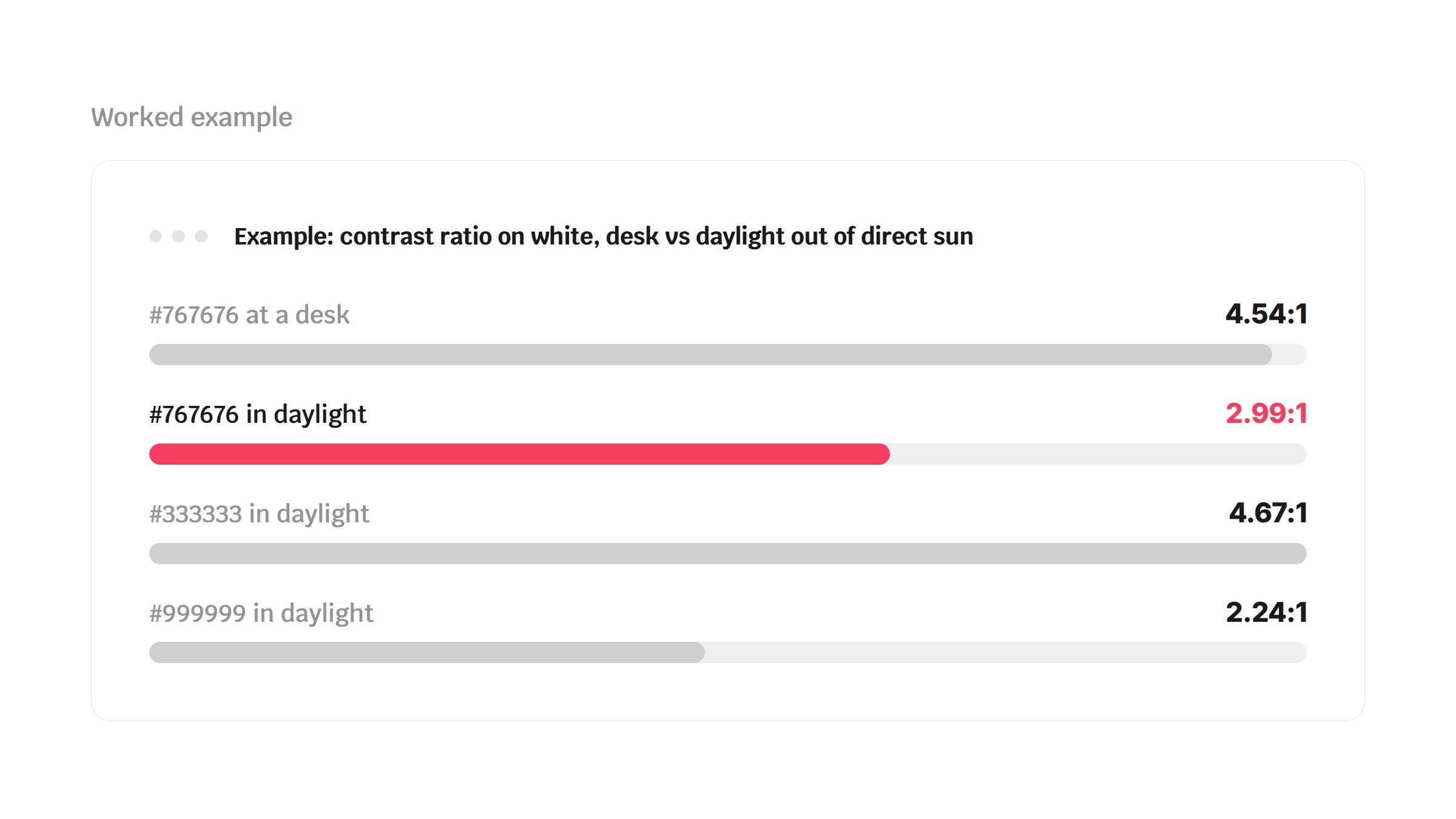
4.54:1 | 2.99:1 |
#999999 pale grey |
2.85:1 | 2.24:1 |
The mid grey is the lightest plain grey that passes 4.5:1 on white indoors. Outside, out of direct sun, it drops below the 3:1 that WCAG asks of large headings, never mind body text. Charcoal loses even more of its ratio in raw terms, but it started so far above the line that it's still over 4.5:1.
So a pass at your desk tells you little about the yard, and prices, hire rates and phone numbers need headroom. On these sums, to keep 4.5:1 in daylight out of direct sun you need about 11.3:1 at the desk, which on white means #3A3A3A or darker.
How common is low colour contrast?
WebAIM tested the home pages of the top million websites in February 2026 and found low contrast text on 83.9% of them, the most common accessibility failure it detected. That's up from 79.1% in 2025 and back to exactly the 2022 figure, undoing three years of falls. The average home page had 34 separate pieces of low-contrast text, up 15% in a year (WebAIM, 2026).
Those are failures against the indoor rule. Going by the sums above, the failure rate in a car park would be higher.
How do you check your website colour contrast this week?
None of this needs a new website.
- Find the text that matters. List the words a buyer came for: prices, rates, availability notes, the depot phone number, form labels.
- Read the ratio. In Chrome on a desktop, right-click the text, choose Inspect, then click the colour swatch next to
colorin the Styles panel and expand the Contrast ratio section. Chrome may default to a different scoring method called APCA; to see the WCAG ratio, clear the Advanced Perceptual Contrast Algorithm (APCA) checkbox in Settings > Preferences > Elements. - Apply the headroom. If anything on your list is under about 11.3:1, darken it. A text colour is a CSS change, not a rebuild, and charcoal looks just as modern as grey.
- Check the forms. Placeholder text is usually lower contrast and disappears when someone starts typing (W3C). Give every field a visible label above it, and remember placeholder text has to meet the contrast rule too.
To get your own number, work out the glare as lux × your phone's reflectance ÷ 3.14, divide it by your screen's brightness in cd/m², and add the result to both sides of the formula in place of 0.18.
When won't this make a difference?
- Dull days. DisplayMate says 1,000 lux corresponds to outdoor daylight with an overcast sky. Run that through the same sum and the glare comes to a few per cent of the screen's white, even with the brightness turned well down, so the indoor ratios roughly hold. The problem is bright days.
- Direct sun. At 100,000 lux the same sum gives glare close to the screen's full white, and even black on white comes out near 2:1. No colour choice survives that.
- Large headings. Text at 24px, or about 18.5px bold, only needs 3:1 (W3C). Spend your headroom on body copy, prices and small print first.
- Your logo. Text in a logo or brand name has no contrast requirement (W3C), so the logo can stay as it is. Brand colours used for ordinary text aren't exempt, though.
- Text over photos. A slogan across a picture of your fleet sits on more than one colour, so check it by eye on a phone outdoors as well.
- A pass isn't the finish line. WebAIM says automated tools can't catch every failure, and a page with no detected errors isn't necessarily accessible.
What should you do next?
Do the four checks above first; they cost nothing. If you'd like the fuller picture, our free website health audit scores your site for accessibility as well as speed and search, on phone and desktop. If the fix turns out to be bigger than a few colour changes, get in touch and we'll tell you straight what it needs.
Tell us what you're building. We reply within a day.